Install
Two parts: uf, the engine that renders on your GPU, and the ultrafast plugin for Claude Code, which brings the skill (how to write and check a video document) and the MCP server (uf mcp, the tools Claude calls).
curl -fsSL https://ultrafast.mov/install.sh | sh        # or: brew install ultrafastmov/tap/ultrafast
claude plugin marketplace add ultrafastmov/ultrafast
claude plugin install ultrafast@ultrafast
It runs on a Mac with Apple silicon or on Linux with a Vulkan GPU. To confirm Claude Code can reach the engine:
$ claude mcp list
plugin:ultrafast:ultrafast: uf mcp - ✔ Connected
Without the plugin, the same two parts install separately: npx skills add ultrafastmov/ultrafast for the skill and claude mcp add ultrafast -- uf mcp for the server. The session below used that route, in an empty folder with no other settings, so nothing else on the machine shaped the result.
The prompt
One message, sent as written:
Make a 10-second vertical video (1080x1920) announcing the opening of a small coffee roastery
called Third Crack: its name, the line "Roasted on Thursdays", and the address 14 Mill Lane.
Warm, slow and confident. Check it, look at the frames, fix anything the review finds, and
export an MP4.
The last sentence names the loop the skill teaches: check the document, look at frames, review every frame, then export.
What Claude did
Every step below is a tool call from the session's log, in order, with what came back.
- Loaded the ultrafast skill and asked
ultrafast_opsfor the parameters of the ops it planned to use:gradient,noise,text,shape,over,vignetteandgrain. - Wrote
third-crack.jsonin one go: a radial brown gradient, slow noise drifting upward as smoke, five layers of type and a thin rule, each with its own timing, then a vignette and film grain. The name rises in letter by letter:"name": { "op": "text", "params": { "text": "Third\nCrack", "font": "Fraunces", "weight": 600, "size": 190, "line_height": 0.98, "color": "#f3e6d3", "align": "center", "valign": "middle", "position": [540, 860], "stagger": 0.08, "glyph_opacity": { "keys": [{ "t": 0.9, "v": 0, "ease": "in_out_sine" }, { "t": 2.1, "v": 1 }] }, "glyph_offset": { "keys": [{ "t": 0.9, "v": [0, 36], "ease": { "bezier": [0.16, 1, 0.3, 1] } }, { "t": 2.4, "v": [0, 0] }] } } } - Fixed its own slip. It had given the tagline two
positionkeys, a fixed one and an animated one, and deleted the fixed one before going on. ultrafast_checkon the document, without rendering:{"issues": []}.ultrafast_sheet: eight frames from 0.5 s to 9.9 s on one image, which Claude looked at. Its note: "Looks right: warm, centered, everything spelled correctly."ultrafast_reviewwith"safe": "social", which reads every frame for clipped, overlapping, low-contrast, too-small or too-brief text and for text under a social app's buttons:{"frames": 300, "issues": [], "seconds": 2.02, "texts": 4}.ultrafast_frameat 9 s, to see the finished card at full size.ultrafast_export:exported 300 frames (1080x1920 @ 30 fps, mp4 h264, high) in 0.36 s (823 fps).- Checked the file with
ffprobe(H.264, 1080×1920, 30 fps, 10.0 s, 1.7 MB) and summed up, including one choice it made on its own: "I added "NOW OPEN" myself to make it read as an opening announcement, so remove it if you'd rather keep to just the three lines you gave me."
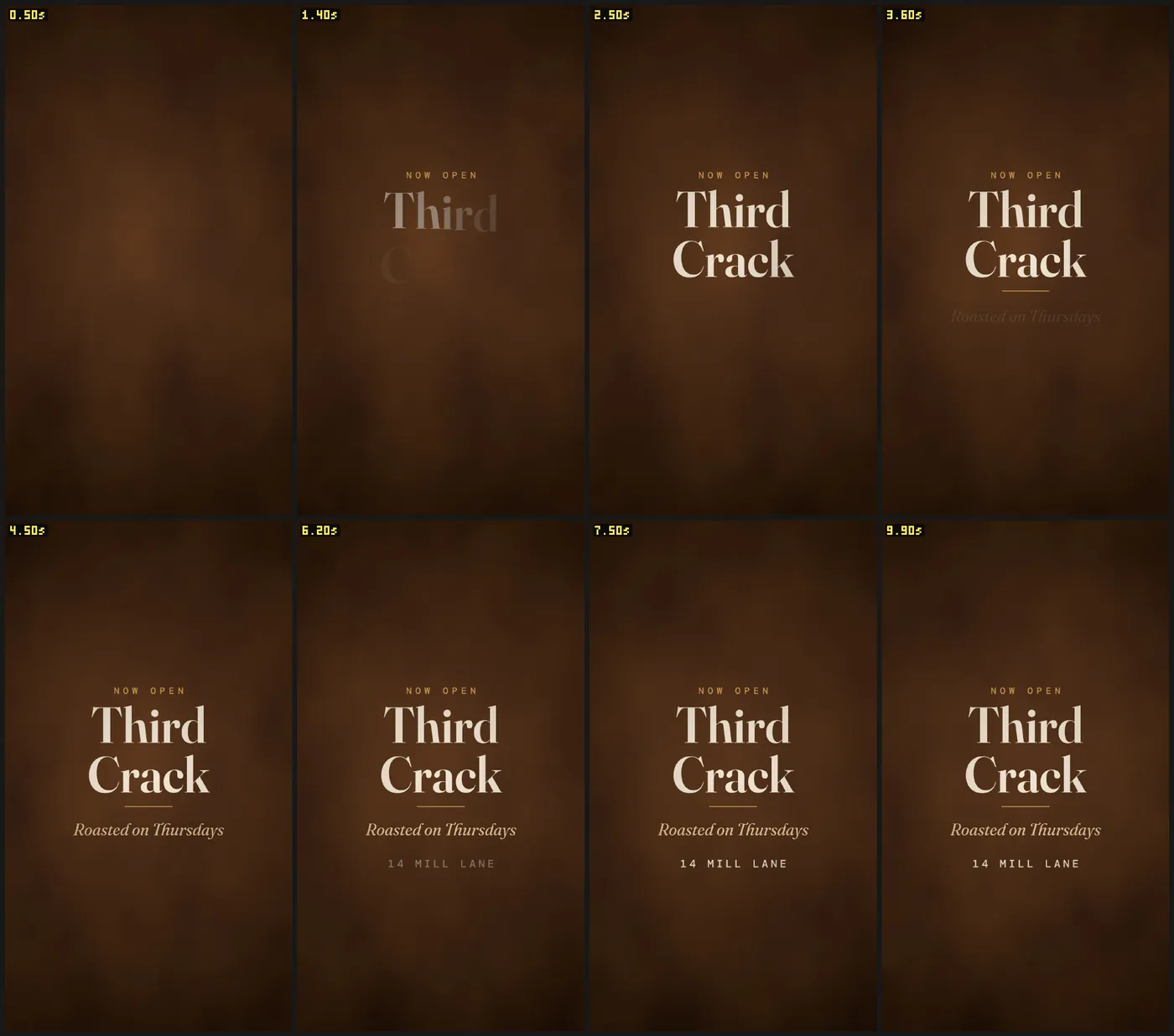
ultrafast_sheet returned it.When the review finds something
This draft passed the review on the first try, so there was nothing to fix. Drafts often don't. The first draft of the pottery class teaser on the home page came back with eight findings, among them:
clipped        "Pottery class" runs off the frame (right by 40 px)
low contrast   "HALDEN CLAY STUDIO" never reaches readable contrast (best 1.6:1, want 3:1 or more)
too brief      "First class free" is readable for 0.4 s; 3 words need about 0.9 s
flashing       more than 3 flashes per second: a photosensitive seizure risk (WCAG 2.3.1)
Each finding names the text and the problem, so Claude can fix the document and run the review again until it comes back empty. That loop is why to ask for it: the agent sees its own mistakes before you do.
Changing it by asking
A second message, in the same session:
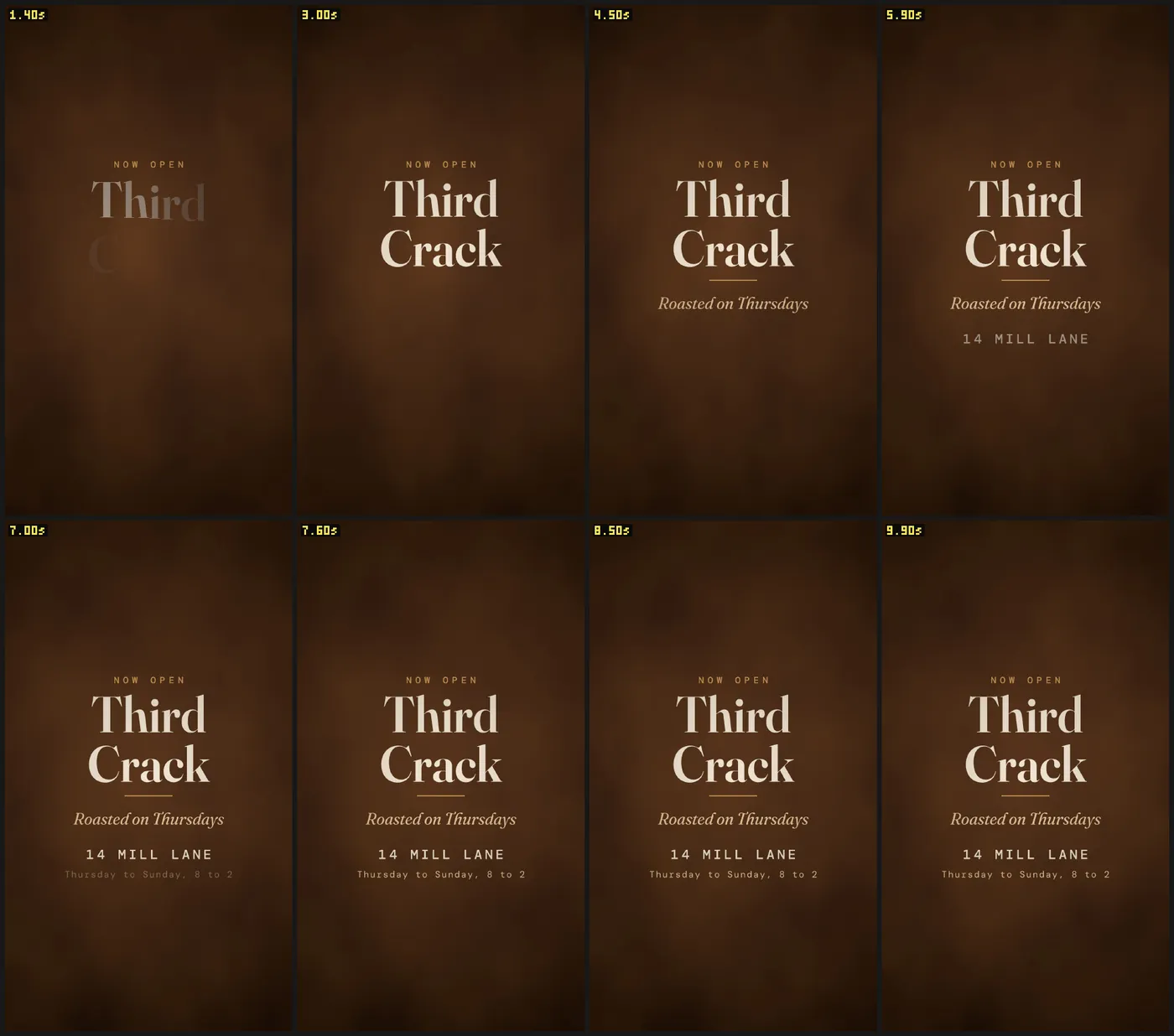
Make the address a little bigger, and add a line under it: Thursday to Sunday, 8 to 2.
Then check, review and export again.
Claude didn't rewrite the file. It sent ultrafast_edit ten changes in one call: it made the address larger, added the new line as a node and wired it into the picture, and moved the other lines up by about 40 px to keep the block centred. Five of the ten:
{ "edit": "set_param", "node": "address", "param": "size", "value": 50 },
{ "edit": "set_param", "node": "address", "param": "position", "value": [540, 1255] },
{ "edit": "add_node", "id": "hours", "node": { "op": "text", "params": {
    "text": "Thursday to Sunday, 8 to 2", "font": "DM Mono", "size": 34, "color": "#e8c79a",
    "align": "center", "valign": "middle", "position": [540, 1330] } } },
{ "edit": "add_node", "id": "c6", "node": { "op": "over", "inputs": { "fg": "hours", "bg": "c5" } } },
{ "edit": "connect", "node": "vig", "port": "source", "source": "c6" }
The check passed. Then the contact sheet showed something the check couldn't: "The hours line sits a bit tight under the address, so I'll give it a little more room before reviewing." A second edit moved it down 15 px and set it 2 px larger. The review read all 300 frames and 5 texts with no findings, and the export took 0.37 s.
Time and tokens
Wall time runs from starting Claude Code to its exit, so it includes start-up, every model turn and every tool call.
| First video | The edit | |
|---|---|---|
| Wall time | 53.1 s | 31.2 s |
| Model turns | 15 | 10 |
| Output tokens | 4,719 | 2,597 |
| Review | 300 frames, 0 issues, 2.0 s | 300 frames, 0 issues, 1.8 s |
| Export | 0.36 s | 0.37 s |
| Cost at API list prices | $0.46 | $0.67 |
Claude Code 2.1.325 with Claude Opus 5.5 and ultrafast 0.2.0; both exports took under 0.4 s on one RTX 5090 workstation. The costs are what Claude Code reported at API list prices. On a Pro or Max plan the session counts toward the plan's usage instead. Most of the wall time is the model thinking and writing; the engine's share, from check to export, was a few seconds per turn.
Prompts to try
Each of these briefs made one of the films on the examples page, where the document behind each one is published:
- "A 10-second vertical teaser for my pottery class. Saturdays, first class free."
- "Turn NOAA's Mauna Loa CO₂ file into a chart for Instagram."
- "Show how Artemis I got to the Moon and back, from NASA's trajectory data."
- "Make every member their year in review from this spreadsheet."
- "A 15-second loop for the album cover: something growing, in celadon."
Say what it's for, how long, the size, and the words that must appear. Give Claude the files it should use (footage, a logo, a data file) by path. For one video per row of a spreadsheet, see Personalized videos from a CSV.
If it doesn't work
✘ Failed to connect — ENOENT: Executable not found in $PATH: "uf"inclaude mcp list: the plugin is installed but Claude Code was started withoutufon its PATH. Open a new terminal after installing, or add the folder the installer printed to your PATH, then start Claude Code again.- Which GPU will it use?
uf infonames the GPU it will render on. ultrafast needs one: Apple silicon on a Mac, or a Vulkan GPU on Linux. - Fonts. The session used Fraunces and DM Mono by name. Fonts named in a document may be downloaded by name the first time they're used, so the first render with a new font needs a network connection.
- Claude doesn't use the tools. Check that the plugin is enabled (
claude plugin list) and name the loop in the prompt: "check it, look at the frames, review it, then export".
Remotion, HyperFrames and other agents
Claude Code also makes video with Remotion (React rendered in headless Chrome) and HyperFrames (HTML and GSAP in headless Chrome). On one RTX 5090, the same three 10-second videos exported in 0.66–0.78 s with ultrafast; Remotion took 3.1–8.6 times as long at its fastest settings, and HyperFrames 4.6–5.7 times (benchmark). For the same 10-second short, the ultrafast document took about 1,234 output tokens against 1,868 for Remotion. Head-to-head pages: ultrafast vs Remotion, ultrafast vs HyperFrames. For every way Claude can make video, including Claude Motion, see Can Claude make videos?
The same skill and MCP server work in Codex, Cursor, Gemini CLI and any MCP client: setup for each is on Integrations, and the tools are listed in MCP server.
Questions
Can Claude Code make videos?
Yes, with a video engine to write for. With the ultrafast plugin, Claude Code writes the video as a JSON document, checks it, looks at its frames, reviews every frame and exports an MP4 on your GPU. In the session on this page that took 53.1 s from the prompt to a 10-second 1080×1920 MP4.
What do I need to install?
The uf engine (curl -fsSL https://ultrafast.mov/install.sh | sh or Homebrew) and the plugin: claude plugin marketplace add ultrafastmov/ultrafast, then claude plugin install ultrafast@ultrafast. It renders on a Mac with Apple silicon or on Linux with a Vulkan GPU.
How many tokens does a video take?
In this session, 4,719 output tokens for the first 10-second video and 2,597 for an edit, with Claude Opus 5.5. A longer or busier video takes more. Measured on the same 10-second short, an ultrafast document was about 1,234 output tokens against 1,868 for Remotion.
Does Claude Code see the video it makes?
It sees frames. ultrafast_sheet returns several frames on one image and ultrafast_frame one frame at full size, and ultrafast_review reads all of them for clipped, low-contrast, overlapping, too-small or too-brief text. In this session Claude spotted a line sitting too close to another on a contact sheet and moved it before exporting.
Can I edit the video after it's made?
Yes, by asking in the same session. Claude changes the document with ultrafast_edit (set a param, add or remove a node, rewire) instead of rewriting it, then checks, reviews and exports again. The edit on this page took 31.2 s.
Does it work on Windows?
Through WSL2 on a machine with a Vulkan GPU. There is no native Windows build.