What it means
You describe the animation as a program or a data file and a renderer draws every frame. Instead of dragging a keyframe, you write that the title rises 160 px over 0.9 s with an exponential ease, and every frame follows from that line. Three things come with it that a timeline doesn't give you:
- Data in, video out. A chart, a name or a price comes from a file, so a hundred versions cost one template. See personalized videos from a CSV.
- Diffs. The video is a text file in git. A change is a line in a pull request, not a new project file.
- Agents can make it. A coding agent can't drag keyframes, but it can write a file, render a frame and look at it. See a real Claude Code session.
The tools, side by side
They split by what you write. Licences and releases are from GitHub, npm and PyPI on 24 November 2026.
| Tool | You write | What draws the frames | Licence | Latest release | Good at |
|---|---|---|---|---|---|
| Remotion | React components | Chrome Headless Shell screenshots each frame; FFmpeg encodes | Remotion License: free up to 3 people, a company licence from 4 | 4.0.546, 23 Nov 2026 | React teams; an embeddable web player |
| HyperFrames | HTML and CSS with a seekable animation (GSAP or another adapter) | headless Chrome captures each frame; FFmpeg encodes | Apache-2.0 | 0.9.86, 23 Nov 2026 | teams who already animate web pages with GSAP |
| Motion Canvas | TypeScript generator functions | its editor draws each frame on a canvas in your browser | MIT | 3.17.2, 14 Dec 2024 | explainers timed to a voice-over, tuned in a live editor |
| Revideo | TypeScript generator functions | a headless browser draws each frame on a canvas | MIT | 0.11.0, 10 Jul 2026 | scenes rendered from code or an endpoint, with a React player |
| Framefields | TypeScript | WebGPU in Node, no browser | Apache-2.0 | 3.0.2, 13 Nov 2026 | GPU rendering from TypeScript, including on Windows |
| Manim | Python | Cairo, or OpenGL | MIT | 0.22.1, 27 Oct 2026 | maths: equations, graphs, geometry |
| Editly | a JSON5 edit spec, or JavaScript | Node.js and FFmpeg, with Canvas and Fabric.js layers | MIT | 0.14.2 on npm, Dec 2022 (0.15.0-rc.1 on GitHub, Jan 2025) | slideshows: clips, photos, titles and music cut together |
| nexrender | a JSON job that swaps text, footage and data into an After Effects project | After Effects' own aerender, on machines with After Effects installed | MIT | 1.63.4, 3 Jun 2026 | versions of templates a designer built in After Effects |
| ultrafast | one JSON document: a graph of nodes with keyed params | GPU kernels on Metal or Vulkan, encoded on the same GPU; no browser | Apache-2.0 or MIT | 0.2.1, 24 Nov 2026 | agents that check and review their own frames; 3D, particles and shaders in the same file as the type |
Pick by what your team already writes. React teams go to Remotion, people who animate web pages with GSAP to HyperFrames, Python people doing maths to Manim, and a studio with After Effects templates to nexrender. Licences, renderers and when to choose each are compared in more detail in open-source Remotion alternatives, and speeds measured on one machine are in Benchmarks.
When an agent writes it
For an agent, two things matter more than they do for a person: how much it has to type, and whether it can see what it made. The same 10-second short came to 1,234 output tokens as an ultrafast document, against 1,868 for Remotion and 1,680 for HyperFrames (method). And the agent gets eyes: uf check finds misspelled params and broken references before anything renders, uf sheet returns a contact sheet as an image, and uf review reads every frame for text that's clipped, too brief or low in contrast. Every demo below went through check and a contact sheet before export, and review found nothing in any of them.
Glyph staggers
Animate one glyph, and the rest follow. Key glyph_offset, glyph_rotation, glyph_scale or glyph_opacity once; each glyph plays those keys stagger seconds after the one before it. The exit at 2 s is two more keys on the same params.
{
  "version": 1,
  "format": { "width": 1920, "height": 1080, "fps": 30, "duration": 3.2 },
  "output": "out",
  "nodes": {
    "bg": { "op": "solid", "params": { "color": "#0d0b14" } },
    "title": { "op": "text", "params": {
      "text": "glyph by glyph", "font": "ultrafast:display", "weight": 800, "size": 220,
      "position": [960, 540], "align": "center", "valign": "middle", "color": "#f6f3ee",
      "stagger": 0.05,
      "glyph_offset": { "keys": [ { "t": 0, "v": [0, 160], "ease": "out_expo" }, { "t": 0.9, "v": [0, 0] },
                                  { "t": 2.0, "v": [0, 0], "ease": "in_expo" }, { "t": 2.5, "v": [0, -160] } ] },
      "glyph_rotation": { "keys": [ { "t": 0, "v": -25, "ease": "out_back" }, { "t": 0.9, "v": 0 } ] },
      "glyph_opacity": { "keys": [ { "t": 0, "v": 0 }, { "t": 0.3, "v": 1 }, { "t": 2.2, "v": 1 }, { "t": 2.5, "v": 0 } ] } } },
    "out": { "op": "over", "inputs": { "fg": "title", "bg": "bg" } }
  }
}stagger_ordersets who goes first:forward,reverse,centerorrandom.- For a typing effect, animate
revealinstead: the number of glyphs shown, withreveal_softnessfor a soft edge. - In After Effects, the same move is a text animator with a range selector. In CSS, it's a span per letter, each with its own
animation-delay.
Draw-on paths
A stroke that draws itself is one animated param: trim_end from 0 to 1. Animate trim_start after it and the line chases itself across the frame, like the thin one at the bottom.
"loop": { "op": "path", "params": {
  "d": "M 470 430 C 640 290, 1330 280, 1480 440 C 1600 570, 1360 720, 940 715 C 560 710, 330 620, 430 470 C 470 420, 560 380, 660 360",
  "stroke": 12, "cap": "round", "join": "round", "color": "#ff5c7a",
  "trim_end": { "keys": [ { "t": 0.3, "v": 0, "ease": "in_out_cubic" }, { "t": 1.3, "v": 1 } ] } } },
"arrow": { "op": "path", "params": {
  "d": "M 1500 820 C 1420 800, 1330 780, 1250 740 M 1250 740 L 1300 690 M 1250 740 L 1320 760",
  "stroke": 12, "cap": "round", "join": "round", "color": "#ff5c7a",
  "trim_end": { "keys": [ { "t": 1.3, "v": 0, "ease": "out_cubic" }, { "t": 1.8, "v": 1 } ] } } },
"comet": { "op": "path", "params": {
  "d": "M 200 900 C 600 980, 1300 820, 1720 920", "stroke": 6, "cap": "round", "color": "#14121c",
  "trim_end":   { "keys": [ { "t": 0.8, "v": 0, "ease": "in_out_sine" }, { "t": 2.2, "v": 1 } ] },
"trim_start": { "keys": [ { "t": 1.1, "v": 0, "ease": "in_out_sine" }, { "t": 2.6, "v": 1 } ] } } },dis SVG path data, so a path copied out of an SVG file works as it is.uf import-svg logo.svgturns a whole file into named paths you can animate one by one, as in Animate an SVG logo.dashand an animateddash_offsetgive marching dashes;morphwithtoblends one shape into another.- The rest of the file is a cream
solid, the text, and threeovernodes that stack the paths on it.
Track mattes
The clip at the top of this page is a mask: footage as the source, white text as the matte. The footage shows only where the text is. Scaling the text up 40 times around a point inside the Y's stem fills the frame and ends the reveal.
{
  "version": 1,
  "format": { "width": 1920, "height": 1080, "fps": 30, "duration": 3.35 },
  "output": "out",
  "nodes": {
    "dark": { "op": "solid", "params": { "color": "#07060b" } },
    "footage": { "op": "video", "params": { "src": "voyager.mp4", "start": 17.36, "fit": "cover" } },
    "letters": { "op": "text", "params": {
      "text": "VOYAGER", "font": "ultrafast:display", "weight": 900, "size": 400, "tracking": -8,
      "position": [960, 540], "align": "center", "valign": "middle", "color": "#ffffff" } },
    "grow": { "op": "transform", "inputs": { "source": "letters" }, "params": {
      "anchor": [704, 640], "position": [704, 640],
      "scale": { "keys": [ { "t": 0, "v": 0.94 }, { "t": 2.1, "v": 1, "ease": "in_expo" }, { "t": 3.3, "v": 40 } ] } } },
    "through": { "op": "mask", "inputs": { "source": "footage", "matte": "grow" }, "params": { "mode": "alpha" } },
    "out": { "op": "over", "inputs": { "fg": "through", "bg": "dark" } }
  }
}modeisalpha,alpha_inverted,lumaorluma_inverted, the same four choices as After Effects' track mattes.- Text stays vector until it's drawn, so a
transformstraight on it is sharp at any scale: the Y's edges stay clean all the way through the zoom. - To find the point to zoom into,
uf measureprints every glyph's box;uf render matte.json --at 0 --out f.pngshows one exact frame. - The footage is NASA's 19 November 2026 message to Voyager 1, the same film used in animated captions. NASA video is in the public domain.
Motion blur
Fast moves look cheap without blur and smooth with it. It's one line on the format: samples per frame, and shutter in frames (0.5 is a 180° shutter). max_samples lets fast frames take more samples, one per 2 px the fastest layer moves, so a whip blurs smoothly instead of in steps.
"format": { "width": 1920, "height": 1080, "fps": 30, "duration": 3,
            "motion_blur": { "samples": 6, "shutter": 0.5, "max_samples": 32 } },
...
"pink": { "op": "shape", "params": { "size": [560, 150], "radius": 75, "color": "#ff5c7a",
  "center": { "keys": [ { "t": 0.2, "v": [-400, 380], "ease": "out_expo" }, { "t": 1.0, "v": [960, 380] },
                        { "t": 2.0, "v": [960, 380], "ease": "in_expo" }, { "t": 2.5, "v": [2400, 380] } ] } } },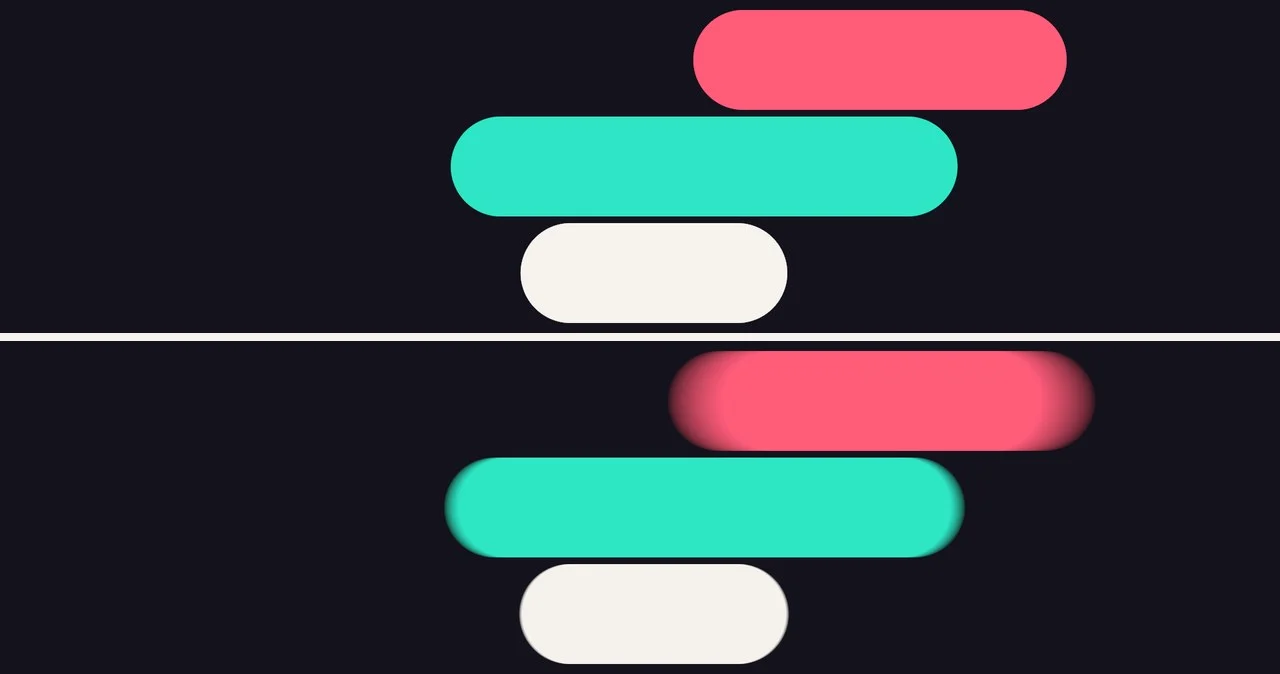
motion_blur (top) and with it (bottom). Each bar blurs by its own speed.Each moving layer is blurred on its own, by what its animated params do. Layers that stay still render once a frame, and so do colour and opacity changes, so the cost follows what moves. On this clip, export took 0.42 to 0.47 s with blur and 0.43 to 0.46 s without: no difference beyond run-to-run noise.
Cuts on the beat
uf beats reads a sound file and prints its tempo and the time of every beat, as JSON:
$ uf beats loop.wav
{
  "bpm": 120.0,
  "beats": [ 0.499, 0.999, 1.498, 1.998, 2.498, 2.998, 3.498, 3.998, 4.498, ... 7.997 ],
  "downbeats": [ ... ],
  "onsets": [ ... ],
  "duration": 8.0
}
A document is plain JSON, so any language can write one. This Python script turns the beats into one shot per beat, each a word on a coloured card, with the loop as the soundtrack:
# beats.py: a cut on every beat of loop.wav, written as an ultrafast document.
import json, subprocess

rhythm = json.loads(subprocess.run(["uf", "beats", "loop.wav"], capture_output=True, text=True, check=True).stdout)
cuts = sorted({0.0, *(b for b in rhythm["beats"] if b < rhythm["duration"] - 0.25)})
ends = cuts[1:] + [rhythm["duration"]]
words = "every cut in this clip lands on a beat that uf beats found in the track".split()
cards = [("#ff5c7a", "#14121c"), ("#14121c", "#f6f3ee"), ("#f6f3ee", "#14121c"), ("#2ee6c5", "#14121c")]

nodes = {"music": {"op": "audio", "params": {"src": "loop.wav"}}}
below = None
for i, (start, end) in enumerate(zip(cuts, ends)):
    paper, ink = cards[i % len(cards)]
    nodes[f"paper{i}"] = {"op": "solid", "params": {"color": paper}}
    nodes[f"word{i}"] = {"op": "text", "timing": {"in": start, "out": end, "offset": start}, "params": {
        "text": words[i % len(words)], "font": "ultrafast:display", "weight": 800, "size": 300, "color": ink,
        "position": [960, 540], "align": "center", "valign": "middle",
        "scale": {"keys": [{"t": 0, "v": 1.25, "ease": "out_expo"}, {"t": 0.35, "v": 1}]}}}
    nodes[f"card{i}"] = {"op": "over", "inputs": {"fg": f"word{i}", "bg": f"paper{i}"}}
    if below is None:
        below = f"card{i}"
        continue
    nodes[f"shot{i}"] = {"op": "over", "inputs": {"fg": f"card{i}", "bg": below},
                         "timing": {"in": start, "out": end}}
    below = f"shot{i}"

doc = {"version": 1, "format": {"width": 1920, "height": 1080, "fps": 30, "duration": rhythm["duration"]},
       "output": below, "nodes": nodes}
json.dump(doc, open("beats.json", "w"), indent=1)
print(len(cuts), "shots, cut at", ", ".join(f"{c:.2f}" for c in cuts[1:5]), "...")$ python beats.py && uf export beats.json beats.mp4
16 shots, cut at 0.50, 1.00, 1.50, 2.00 ...
exported 240 frames (1920x1080 @ 30 fps, mp4 h264, standard) in 0.34 s = 701 fps, 0 readbacks -> beats.mp4- Each shot's
timingwindow puts it on screen from its beat to the next. Outside its window, anoverpasses the shot below it through and costs nothing. "offset": startstarts each word's own clock at its cut, so the same scale keys make every word pop as it lands.- The loop was made for this page: kick, snare and hi-hats at 120 BPM, written by a short NumPy script.
uf beatsread it in 0.13 s. Its list starts at 0.5 s, without the first kick at 0 s, so the script adds the cut at 0.0 itself, and it drops the last entry, 7.997 s, which is the end of the loop. - To pulse a param with the music instead of cutting, use an
audiodriver; it follows one band of the soundtrack.downbeatsandonsetsare in the same output for cuts on the bar or on every hit.
Render times
| Document | Frames | Export |
|---|---|---|
stagger.json, 3.2 s | 96 | 0.46–0.47 s |
drawon.json, 3 s | 90 | 0.44–0.48 s |
matte.json, 3.35 s, with 1080p footage | 101 | 1.5 s |
blur.json, 3 s, motion blur on | 90 | 0.45–0.46 s |
beats.json, 8 s, with sound | 240 | 0.87–0.91 s |
uf review beats.json | 240 | 0.66–0.68 s |
Wall clock from the command to the file, warm, three runs each, on one RTX 5090 workstation with the published 0.2.1 binary, all at 1920×1080 and 30 fps to H.264. Most of the matte's time goes to decoding the source footage. The clips on this page are 1280×720 copies of these exports.
When a timeline is better
- Timing judged by eye. If a designer is nudging a curve until it feels right, a graph editor is faster than editing numbers. ultrafast's live player (
uf live) applies edits on the next frame, which helps, but it isn't a graph editor. - Character animation, rotoscoping and plugin looks. Rigs, hand-drawn frames and third-party After Effects plugins have no equivalent in a document.
- Work that already lives in After Effects. Keep the project and automate it with nexrender, or export the parts that Bodymovin supports to Lottie and bring them in: Lottie to MP4 lists what carries over and what doesn't. Which After Effects features have an ultrafast equivalent is in After Effects alternatives.
- Where ultrafast itself doesn't fit: it needs a GPU, on an Apple silicon Mac or on Linux or WSL2 with Vulkan. Videos are JSON documents, not React components, its player is a desktop window you can't embed in a web page, and hosted rendering is still on a waitlist.
Questions
What is the best tool for motion graphics with code?
It depends on what you already write. React teams use Remotion, people who animate web pages with GSAP use HyperFrames, maths in Python is Manim, and After Effects templates are automated with nexrender. ultrafast fits when an agent writes the video and should check its own frames, or when 3D, particles and shaders belong in the same file as the type. All of them except Remotion are under MIT or Apache-2.0.
Can I make motion graphics with Python?
Yes. Manim is written in Python. ultrafast documents are JSON, so a Python script can write one: the beats.py example on this page reads the beat times from uf beats and writes a cut on every beat.
Do I need After Effects for motion graphics?
No. Glyph staggers, draw-on strokes, track mattes and motion blur are all params in an ultrafast document. Keep After Effects for timing judged by eye, character work and plugin looks, or bring its animation over as Lottie.
Can an AI agent make motion graphics?
Yes. A coding agent such as Claude Code writes the document, looks at a contact sheet, fixes what it sees and exports, through the ultrafast CLI or its MCP server. The Claude Code guide shows a real session from prompt to MP4.
How fast do these render?
On one RTX 5090 workstation, the three-second clips on this page exported in 0.44 to 0.48 s each, the 8-second beat cut with sound in 0.87 to 0.91 s, and the matte over 1080p footage in 1.5 s.