Updated . ultrafast wrote this page about its own engine, which is one of the renderers on it. ultrafast's numbers come from the 0.2.1 release on one Linux workstation; Remotion's and HyperFrames' come from the open benchmark. Sources are at the end.
Two ways to draw a frame
Remotion and HyperFrames, the best-known tools for making video from code, describe a video as a web page. To render it, they open the page in headless Chrome, move every animation to the time of one frame, and capture what Chrome draws. Remotion's docs put it in one line: “Each Chrome tab renders web content and then screenshots it.” HyperFrames' docs: “Rendering never plays your video. It asks for one frame at a time.” FFmpeg then turns the captured frames into an MP4.
ultrafast describes a video as a JSON document: a graph of nodes such as text, shapes, footage, blurs and 3D, with animated parameters. It plans that graph once, turns it into a few GPU programs (kernels), runs them for every frame, and passes each finished frame to the hardware encoder on the same GPU.
| Browser renderer (Remotion, HyperFrames) | ultrafast | |
|---|---|---|
| The video is | a web page: React components (Remotion), or HTML, CSS and GSAP (HyperFrames) | one JSON document: nodes, how they connect, and animated params |
| Before the first frame | start Chrome and load the page; Remotion's default command bundles it with webpack first | plan the graph and compile its kernels; later runs load them from a disk cache |
| For each frame | seek every animation to the frame's time; Chrome runs the page's scripts, lays it out, paints and composites it | evaluate the animation curves on the CPU, write the values to one buffer, run the kernels |
| The GPU | Remotion's docs: “in many cases, the GPU is disabled in headless mode”; --gl turns it on. HyperFrames' Chrome found the GPU by itself on the benchmark machine | draws every pixel: Metal on a Mac, Vulkan on Linux |
| Getting the frame out | a screenshot in Remotion (JPEG by default); Chrome's HeadlessExperimental.beginFrame in HyperFrames | nothing to get out: the last kernel writes the frame in the encoder's format, in memory the encoder reads |
| Encoding | FFmpeg, with libx264 on the CPU by default | the GPU's encoder (NVENC on NVIDIA, VideoToolbox on a Mac); ffmpeg only puts the stream and the sound in the MP4 |
| To go faster | more browser tabs or workers, each with its own copy of the page | less work per frame: fused kernels, cached still layers, bounds |
Where a browser renderer's time goes
The benchmark timed three 10-second videos (a title card, an animated chart, and captioned footage) in all three tools on one workstation, each written the way the tool's docs teach, and recorded how many CPU threads each render kept busy and how much memory it used at its peak. On that machine's RTX 5090 and 16-core Ryzen 9 9950X3D2, ultrafast exported each video in under 0.8 s:
| Three 10-second 1080p videos | Export time | CPU threads busy, on average | Peak memory |
|---|---|---|---|
| ultrafast 0.2.0, default command | 0.66–0.78 s | 0.9–1.0 | 73–132 MiB |
| Remotion, fastest setting found | 2.25–6.69 s | 4.1–6.1 | 1,668–3,962 MiB |
| HyperFrames, fastest setting found | 3.31–4.46 s | 3.5–5.5 | 1,976–2,789 MiB |
What changed the browser tools' times, and what didn't:
- A faster encoder barely helped. Switched to NVENC, the hardware encoder ultrafast uses, Remotion was between 0.22 s faster and 0.04 s slower, and HyperFrames 0.1 to 0.4 s slower. Their time isn't spent in the encoder.
- Chrome's GPU helped some. Turning it on with
--glcut Remotion's times by 7 to 24%: from a prebuilt bundle, 3.19 to 2.42 s on the title card, 2.90 to 2.25 s on the chart, 7.22 to 6.75 s on the footage. - More tabs stop paying. Remotion decodes the clip in every tab, so the footage took 8.6 s at 8 tabs and 21.7 s at 32, with 17,853 MiB of memory at the peak.
- Even one frame takes seconds. A single PNG of frame 150 took 2.16–2.29 s in Remotion and 1.52–2.10 s in HyperFrames, against 0.20–0.70 s in ultrafast.
ultrafast's own time is mostly start-up as well: of its 0.66 to 0.78 s, rendering and encoding the 300 frames took 0.22 to 0.36 s. The rest is starting the process and the GPU, and writing the MP4.
One kernel for 120 layers
Here's a document that would be slow to draw one layer at a time: 120 circles, each its own layer, flying in over a gradient and then drifting for ten seconds. This script writes it:
import json, math

nodes = {"bg": {"op": "gradient", "params": {"kind": "linear", "a": "#0b1020", "b": "#2a1550", "angle": 90}}}
below = "bg"
for i in range(120):
    a = 2 * math.pi * i / 120
    r = 120 + 300 * (i * 37 % 120) / 120
    x, y = 960 + r * math.cos(a), 540 + 0.8 * r * math.sin(a)
    rgb = [int(127 + 120 * math.cos(math.radians(i * 47 + k))) for k in (0, 120, 240)]
    nodes[f"d{i}"] = {"op": "shape", "params": {
        "kind": "circle", "size": [36, 36], "color": "#%02x%02x%02x" % tuple(rgb),
        "center": {"keys": [
            {"t": 0, "v": [x, 1200 + 4 * i], "ease": {"bezier": [0.16, 1, 0.3, 1]}},
            {"t": 1.5 + i % 20 * 0.05, "v": [x, y]},
            {"t": 8, "v": [x + 60 * math.cos(3 * a), y - 40]}]}}}
    nodes[f"o{i}"] = {"op": "over", "inputs": {"fg": f"d{i}", "bg": below}}
    below = f"o{i}"

doc = {"version": 1, "format": {"width": 1920, "height": 1080, "fps": 30, "duration": 10},
       "output": below, "nodes": nodes}
json.dump(doc, open("layers.json", "w"))
uf plan prints what the engine will run for each frame (the list of node names is cut here):
$ uf plan layers.json
plan: 241 nodes in 1 kernels, 1 texture slots, output slot 0
  g0   fused   -> slot 0  [d119 d118 d117 ... o117 o118 o119]
All 241 nodes (the gradient, 120 shapes and 120 over composites) become one GPU program. For each pixel it evaluates the gradient, then each circle in turn, and blends it in, in registers. No layer is written to a texture and read again by the next. On the RTX 5090 that kernel takes 0.19 ms a frame (uf profile), and the export of 300 frames at 1920×1080 took a median of 0.26 s to render and encode, and 0.67 s for the whole command:
$ uf export layers.json layers.mp4
exported 300 frames (1920x1080 @ 30 fps, mp4 h264, standard) in 0.26 s = 1162 fps, 0 readbacks -> layers.mp4
  per frame: cpu 0.1 ms (media 0.0 ms, of it images 0.0 ms), gpu 0.2 ms, waiting on gpu 0.0 ms, encoder 0.8 ms (waiting on it 0.7 ms), uploads 0.00 MB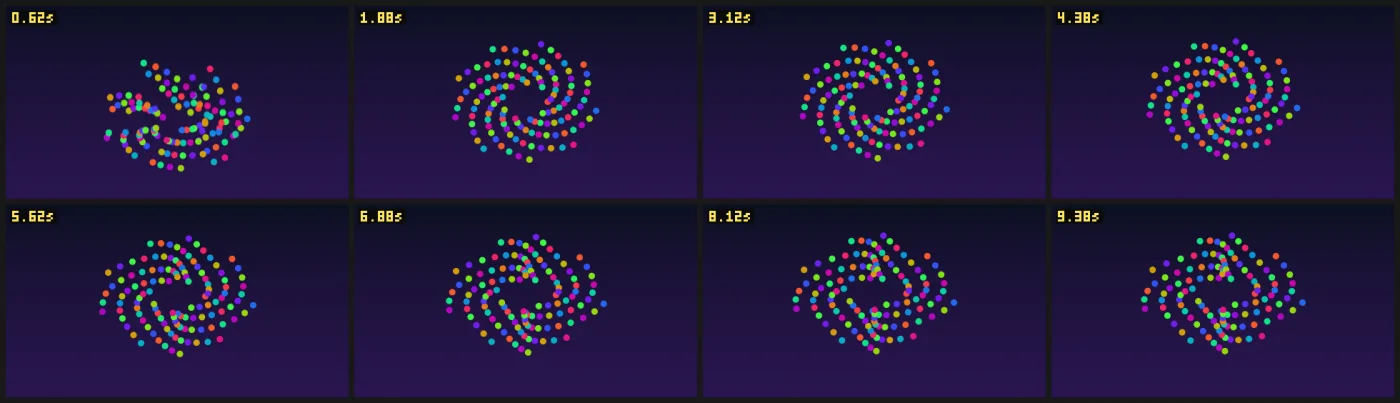
layers.json, with motion blur on. Each frame is one kernel run, or six while the dots fly in.The planner works back from the output and drops anything that doesn't reach it. Then it decides which nodes have to become textures: the output, a node that feeds more than one other node, the input of a blur or a custom shader, and a heavy layer that never changes sitting under one that does, which is drawn once and kept. Each of those roots a group, and everything above it that can be inlined joins the group's kernel. Transforms fold into the math: a shape under a transform is evaluated at the transformed position, not drawn and then resampled.
Two more things keep a fused kernel cheap. An over evaluates its foreground only inside that layer's bounds, so each pixel pays for the circles that cover it and no others. Text and vector paths are rasterized on the GPU with exact area coverage, into textures the size of what they cover, not the whole frame.
Real videos need more groups. The GitHub repo film of rust-lang/rust plans 297 nodes into 65 kernels and 21 textures: 59 kernels draw its text and chart shapes and 6 composite everything. Its 510 frames at 1080p exported in 0.49 s, with 0 readbacks.
Frames that stay on the GPU
A 1080p frame is 8.3 MB as 8-bit RGBA, so ten seconds at 30 fps is 2.5 GB. A renderer that draws on the GPU and encodes on the CPU has to copy all of it across first. ultrafast skips the copy where the hardware allows:
- NVIDIA on Linux. The last kernel converts the frame to NV12 (BT.709) in a buffer whose Vulkan memory is shared with CUDA, and NVENC encodes it where it is. Three buffers keep the GPU drawing ahead of the encoder. Each frame is encoded in strips, one per encoder engine on the card (up to three): on an RTX 5090, 0.7 ms for a 1080×1920 frame instead of 1.7 ms whole. ffmpeg only puts the encoded stream and the sound into the MP4.
- A Mac with Apple silicon. Each frame is drawn straight into the buffers of VideoToolbox, the hardware encoder.
To see what the copy costs, the same export can be forced through it with ULTRAFAST_NVENC=0. Every frame is then read back to the CPU and piped to ffmpeg, which on this machine still encodes with NVENC (h264_nvenc):
$ ULTRAFAST_NVENC=0 uf export layers.json layers-rb.mp4
exported 300 frames (1920x1080 @ 30 fps, mp4 h264, standard) in 0.94 s = 318 fps, 300 readbacks -> layers-rb.mp4
  per frame: cpu 1.0 ms (media 0.0 ms, of it images 0.0 ms), gpu 0.0 ms, waiting on gpu 0.0 ms, encoder 1.7 ms (waiting on it 0.0 ms), uploads 0.00 MB
Nothing else changed, and the median went from 0.26 s to 0.99 s, or from 0.67 s to 1.55 s for the whole command. That's the cost of copying each frame off the GPU, piping it to ffmpeg, and encoding it whole instead of in strips.
Footage comes in the same way where it can. On Linux, NVDEC decodes H.264 in MP4 (8-bit 4:2:0) on the GPU's video engines straight into memory the renderer reads; other files are decoded by an ffmpeg process and uploaded. On a Mac, VideoToolbox decodes into surfaces Metal reads without a copy.
Some exports can't avoid the copy. ProRes, AV1, VP9, anything with alpha, GIFs, and PNG or EXR sequences are read back and encoded by ffmpeg on every platform, and so is H.264 or HEVC on a Linux GPU without NVENC.
Motion blur that only re-renders what moves
Film blurs what moves because the shutter stays open for part of each frame. A renderer gets the same look by drawing several moments inside that window and averaging them, which multiplies the work by the number of samples. ultrafast skips most of that work:
- A group that reads nothing moving renders once, at the frame's time, and every sample reuses it.
- Anything that moves less than 1.5 px while the shutter is open counts as still. That blur wouldn't show.
- A frame in which nothing moves renders once.
- With
max_samplesset, the number of samples follows how far the fastest layer travels, so a slow drift takes few and a fast slide takes many. - A 3D scene renders again only about every 1.5 px it moves on screen; the samples in between reuse the last render.
With six samples on layers.json ("motion_blur": {"samples": 6, "shutter": 0.5} in its format), the kernel ran six times a frame while the circles flew in and once a frame after they slowed to a drift: 1.7 times a frame over the whole video, according to uf profile. The export took a median of 0.28 s instead of 0.26 s.
Edits that don't recompile
An agent working on a video changes a lot of values: a colour, a timing, a word. The plan is keyed by the document's structure (which ops, how they're wired, which params are animated), not by the values, so changing a value reuses the plan and every compiled kernel, and the new value is in the parameter buffer on the next frame. uf edit says which kind an edit was:
$ uf edit layers.json recolour.json --out layers2.json    # set_param: d7's color
Params
$ uf edit layers.json glow.json --out layers3.json        # add_layer: a bloom over everything
Structure
A structural edit replans, but kernels are cached by a hash of their generated code, in memory and on disk, so a replan seldom has anything new to compile. When it does, the live preview draws the new group with simpler kernels, one per op, until the fused one is ready. An export waits for it instead, so the file doesn't depend on timing. The first run on a machine compiles the GPU pipelines, which added 1.1 to 1.4 s to the benchmark's cold runs.
What a browser does better
- The web platform. CSS layout, any web font, every npm package, and the React or HTML components a team already has. ultrafast has its own layout (text, stacks, charts and blocks), and a video is a JSON document, not a page.
- A player in the page. Remotion's Player plays a composition live inside a web app. ultrafast doesn't have one.
- No GPU needed. Chrome renders on any machine, and Remotion Lambda renders on AWS Lambda, which has no GPU. ultrafast needs a Mac with Apple silicon or Linux with a Vulkan GPU (Windows through WSL2); without one, its Docker image renders on the CPU through Mesa's software Vulkan driver, much more slowly.
- HDR and HLS. HyperFrames writes HDR10 and HLS. ultrafast doesn't write either yet.
The comparison covers the rest: licences, agent tools and cost.
Measure it yourself
Every number above for ultrafast can be checked on your own GPU with the released CLI:
curl -fsSL https://ultrafast.mov/install.sh | sh    # or: brew install ultrafastmov/tap/ultrafast
python3 layers.py                                   # the script above
uf plan layers.json                                 # groups and kernels
uf profile layers.json --frames 300                 # GPU time per group
uf export layers.json layers.mp4                    # time, fps and readbacks
ULTRAFAST_NVENC=0 uf export layers.json rb.mp4      # the same through a readback (NVIDIA on Linux)
uf estimate layers.json                             # what an export will cost, before running it
The head-to-head benchmark against Remotion and HyperFrames, with one script that runs all three, is at ultrafastmov/benchmarks. The engine's design notes are in docs/ARCHITECTURE.md, and every command is in the CLI reference.
Questions
Why is Remotion rendering slow?
Each frame is a web page that headless Chrome lays out, paints and screenshots, and by default Chrome often draws it without the GPU while FFmpeg encodes with libx264 on the CPU. Remotion's docs suggest tuning --concurrency, keeping JPEG frames and turning on the GPU with --gl. On one RTX 5090 workstation, Remotion's fastest setting found took 2.25 to 6.69 s for 10-second videos that ultrafast exported in 0.66 to 0.78 s (benchmark).
Does Remotion use the GPU?
Not always. Remotion's docs say the GPU is disabled in headless mode in many cases and is turned on with the --gl flag, and AWS Lambda has no GPU at all. In the benchmark, turning it on cut Remotion's times by 7 to 24%. Either way it only helps Chrome draw the page; the frame still has to be captured and handed to FFmpeg.
Does hardware encoding make a browser renderer fast?
It doesn't, on its own. In the benchmark, switching Remotion and HyperFrames to NVENC, the same hardware encoder ultrafast uses, changed their times by less than half a second either way. Their time goes into running, drawing and capturing the page for every frame; the encoder isn't the slow part.
What is kernel fusion?
Combining many operations into one GPU program, so intermediate results stay in registers instead of being written to a texture and read back by the next step. ultrafast's planner fuses every node it can inline into the kernel of the next node that must become a texture: 120 animated circles composited over a gradient, 241 nodes in all, run as one kernel.
Which GPUs does ultrafast render on?
Apple silicon Macs through Metal, and Linux GPUs through Vulkan; Windows through WSL2. Exports skip the readback with NVENC on NVIDIA and VideoToolbox on a Mac. Other GPUs, and formats such as ProRes, AV1 or anything with alpha, read each frame back and encode it with ffmpeg. Without a GPU, the Docker image renders on the CPU through Mesa's software Vulkan driver, much more slowly.
Sources
All read on 24 November 2026.
- Remotion: concurrency (tabs that render and screenshot), GPU (off in headless mode in many cases,
--gl, none on Lambda), render CLI (JPEG frames by default, Chrome Headless Shell,--hardware-acceleration), performance. - HyperFrames: deterministic rendering (one frame at a time,
beginFrame, FFmpeg), performance. - Benchmark: ultrafastmov/benchmarks (every configuration with its CPU, memory and GPU use) and the benchmark page.
- ultrafast: the source: the planner, the motion blur and the NVENC and NVDEC paths, as released in 0.2.1.