Install
Three parts: uf, the engine that renders on your GPU; the ultrafast skill, which teaches Codex how to write and check a video document; and the MCP server, uf mcp, which gives Codex the tools it calls.
curl -fsSL https://ultrafast.mov/install.sh | sh        # or: brew install ultrafastmov/tap/ultrafast
npx skills add ultrafastmov/ultrafast -a codex          # the skill, into .agents/skills in your project
Then add the server to ~/.codex/config.toml (codex mcp add ultrafast -- uf mcp writes the first three lines; add the other two yourself):
[mcp_servers.ultrafast]
command = "uf"
args = ["mcp"]
tool_timeout_sec = 300                    # long exports outlast the 60 s default
default_tools_approval_mode = "approve"   # run ultrafast's tools without asking
It runs on a Mac with Apple silicon or on Linux with a Vulkan GPU. To confirm Codex can see the server:
$ codex mcp list
Name       Command  Args  Env  Cwd  Status   Auth
ultrafast  uf       mcp   -    -    enabled  Unsupported
The approval line
MCP lets a server mark which of its tools change files. ultrafast marks the ones that do, such as ultrafast_edit and ultrafast_export, and Codex wants an approval before it runs a tool marked that way. default_tools_approval_mode = "approve" tells Codex to run ultrafast's tools without asking. They work on local files: the documents, media and videos named in each call.
Without that line, codex exec can't ask anyone, so it refuses. A run of the same prompt without it got this back from both tools:
MCP tool call requires approval, but approval policy is neverCodex then changed the document with Python, and when the export was refused it drew the text with FFmpeg instead. It said so in its summary, but that video wasn't made by ultrafast and was never reviewed. Add the line, or approve the calls yourself in an interactive session.
The prompt
One message, sent as written to codex exec in an empty git folder that had only the skill in it:
Make a 12-second 16:9 video (1920x1080) announcing version 2.0 of gullwing, a small
command-line tool for tidying old git branches. Show the name, the line "2.0 is out",
and its three new features: watch mode, plugins, and a Windows build. Dark, crisp and
quick, in a monospace face. Check it, look at the frames, fix anything the review finds,
and export an MP4.
gullwing is made up for this test. The last sentence names the loop the skill teaches: check the document, look at frames, review every frame, then export.
What Codex did
Every step below is from the session's log, in order, with what came back. Codex called ultrafast's tools 22 times and ran 13 shell commands.
- Read the skill from
.agents/skills/ultrafast/SKILL.md, then askedultrafast_opsfor the parameters of the ops it planned to use:text,gradient,solid,rect,shape,over,grainandvignette. - Wrote
gullwing-2.0.jsonwith one shell command: a radial gradient in dark blue, two hairlines, a shell prompt line, the name, the tagline, a feature list with a green rule beside it, and a closing card, all in JetBrains Mono. The name, as it ended up after the fixes below:"brand": { "op": "text", "params": { "text": "gullwing", "font": "JetBrains Mono", "weight": 700, "size": 132, "color": "#eff5f2", "align": "center", "position": [960, 360], "tracking": -3, "opacity": { "keys": [{ "t": 0, "v": 0 }, { "t": 0.25, "v": 0 }, { "t": 2.17, "v": 1, "ease": "out_expo" }, { "t": 2.35, "v": 0 }] } } } ultrafast_checkfound one thing: the closing line wasnot reachable from the output (not rendered). Codex had written it but never layered it into the picture. It added anovernode, and the check came back empty.ultrafast_sheet: nine frames on one image. Every line of text was on screen at once, the name drawn over the feature list.ultrafast_reviewon the same draft reported only three lines set under 24 px. Codex went by the picture: "The first render exposed a timing issue: the editor is drawing later text over the opening, and the ending command line is too small."- Read
references/document.mdfrom the skill for how timing works, moved the timing onto the layers, and looked again. The review now came back empty, but the sheet still showed the name over the list for the first two seconds. Codex askedultrafast_inspectwhich nodes were visible at 0.67 s, then rewrote every line's visibility as opacity keys. ultrafast_reviewthen found 11 problems, the kind a person would catch on a phone. Three of them:Codex's note: "the review caught long opacity ramps that made several captions fade too slowly and become hard to read. I'm changing those to short entrances, steady holds, and quick exits, and brightening the supporting copy."too brief "2.0 is out" is readable for 0.6 s; 3 word(s) need about 0.9 s low contrast "Keep an eye on branches as they age." is hard to read here (down to 1.4:1) too brief "Native binaries. Same tidy branches." is readable for 0.4 s; 5 word(s) need about 1.4 s- Two more rounds. One finding was left, a line that dipped to 1.7:1 contrast. Codex brightened the supporting lines and set them at 26 px. The review read all 360 frames and 14 texts in 3.2 s with no findings.
ultrafast_export:exported 360 frames (1920x1080 @ 30 fps, mp4 h264, high) in 0.48 s (748 fps). Codex checked the file withffprobe(H.264, 1920×1080, 30 fps, 12.0 s) and gave the paths to the MP4 and the document.
Codex never called ultrafast_edit. It changed the document with short Python scripts that load the JSON, set a few values and save it. Either works: the document is a plain file, and every tool reads it again on the next call.
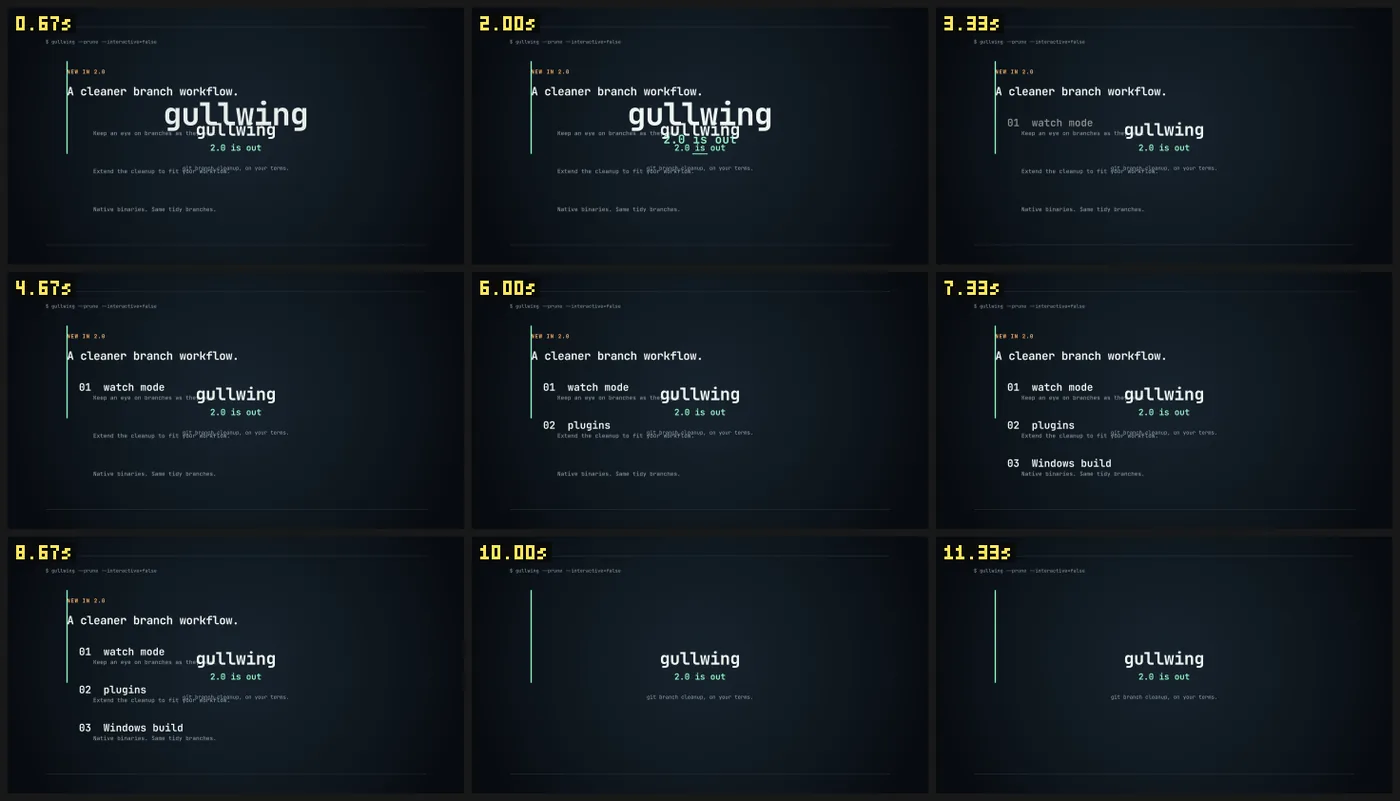
uf review 0.2.1, now reported); the sheet showed it, and Codex fixed it.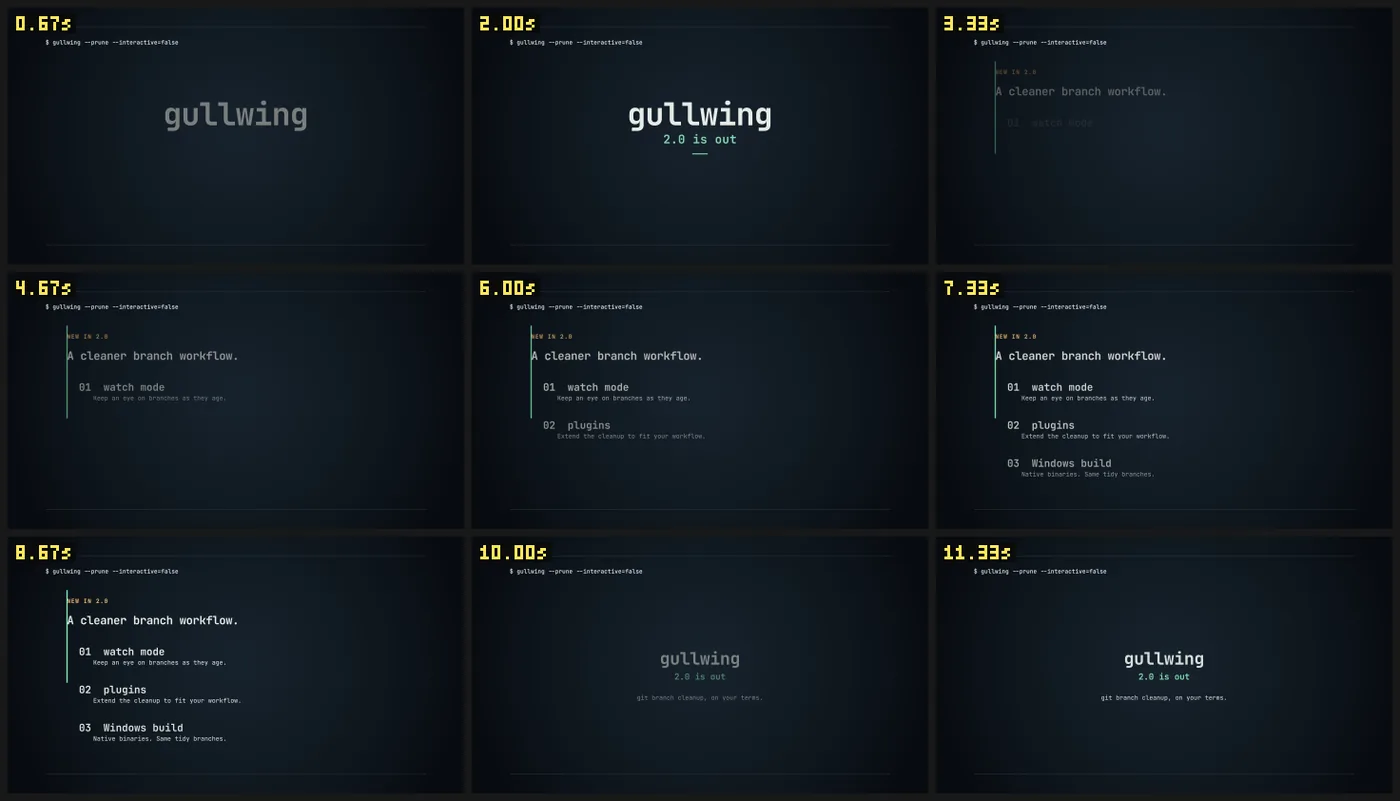
Changing it by asking
The exported video had one flaw that nothing flagged: the green rule ran through the first letter of two lines. uf review compares text against text, not against shapes. A second message, in the same session (codex exec resume):
The green bar on the left runs through the first letter of "NEW IN 2.0" and of the headline;
give them some room. Then make a square 1080x1080 copy for LinkedIn next to it, with the same
words. Check, review and export both.
Codex moved the two lines 40 px to the right, copied the document, set the copy to 1080×1080 and laid it out again. The review of the square copy flagged lines set at 20 and 23 px, below the 24 px it asks for. Codex set them at 24 px, the review came back empty for both, and the exports took 0.31 s for the square and 0.46 s for the wide one.
Time and tokens
Wall time runs from starting codex exec to its exit, so it includes start-up, every model turn and every tool call.
| First video | Fix and square copy | |
|---|---|---|
| Wall time | 237.4 s | 67.9 s |
| ultrafast tool calls | 22 | 11 |
| Shell commands | 13 | 4 |
| Output tokens | 10,390 (4,275 of them reasoning) | 2,657 (1,008 reasoning) |
| Final review | 360 frames, 0 issues, 3.2 s | 360 frames each, 0 issues |
| Export | 0.48 s | 0.31 s square, 0.46 s wide |
Codex CLI 0.169 with its default model, GPT-6-Luna, and ultrafast 0.2.1; every export took under half a second on one RTX 5090 workstation. Codex reports tokens, not a price; on a ChatGPT plan a session counts toward the plan's usage. Most of the wall time is the model thinking and writing. The engine's share was a few seconds per round: a check or a nine-frame sheet takes under 0.3 s, a review of all 360 frames 2 to 4 s.
If it doesn't work
MCP tool call requires approval, but approval policy is never: adddefault_tools_approval_mode = "approve"to the server's entry (above), or run Codex interactively and approve the calls.- Exports take seconds instead of a fraction of one, or
ufprintsNVENC unavailable (cuInit: CUDA error 100): Codex ranufas a shell command inside its sandbox. On Linux the sandbox hides the GPU, souf inforeportsllvmpipe, a Vulkan driver that draws on the CPU. The vertical template took 4.44 s to export that way and 0.16 s on the GPU. Codex starts MCP servers outside the sandbox, so the ultrafast tools render on the GPU: ask Codex to use them instead of theufcommand. - Codex doesn't use the skill.
npx skills add ultrafastmov/ultrafast -a codexputs it in.agents/skills/ultrafastin the folder you run it from. Start Codex in that folder, or name it in the prompt: "use the ultrafast skill". - Which GPU will it use?
uf infonames the GPU it will render on. ultrafast needs one: Apple silicon on a Mac, or a Vulkan GPU on Linux. - Fonts. The session used JetBrains Mono by name. Fonts named in a document may be downloaded by name the first time they're used, so the first render with a new font needs a network connection.
Remotion, HyperFrames and other agents
Codex also makes video with Remotion (React rendered in headless Chrome), whose agent skills install with npx skills add remotion-dev/skills, and with HyperFrames (HTML and GSAP in headless Chrome). On one RTX 5090, the same three 10-second videos exported in 0.66–0.78 s with ultrafast; Remotion took 3.1–8.6 times as long at its fastest settings, and HyperFrames 4.6–5.7 times (benchmark). For the same 10-second short, the ultrafast document took about 1,234 output tokens against 1,868 for Remotion. Head-to-head pages: ultrafast vs Remotion, ultrafast vs HyperFrames.
The same skill and MCP server work in Claude Code (a recorded Claude Code session), Cursor, Gemini CLI and any MCP client: setup for each is on Integrations, and the tools are listed in MCP server.
Questions
Can Codex make videos?
Yes, with a video engine to write for. With the ultrafast skill and MCP server, Codex writes the video as a JSON document, checks it, looks at its frames, reviews every frame and exports an MP4 on your GPU. In the session on this page that took 237 s from the prompt to a 12-second 1920×1080 MP4, and the export itself 0.48 s.
What do I need to install?
The uf engine (curl -fsSL https://ultrafast.mov/install.sh | sh or Homebrew), the skill (npx skills add ultrafastmov/ultrafast -a codex) and the server in ~/.codex/config.toml: command = "uf", args = ["mcp"], tool_timeout_sec = 300 and default_tools_approval_mode = "approve". It renders on a Mac with Apple silicon or on Linux with a Vulkan GPU.
Why does codex exec refuse ultrafast_export?
ultrafast marks the tools that change files as such, and Codex wants an approval before running them. codex exec can't ask, so it refuses with "MCP tool call requires approval, but approval policy is never". default_tools_approval_mode = "approve" in the server's entry lets Codex run ultrafast's tools without asking.
How many tokens does a video take?
In this session, 10,390 output tokens for the first 12-second video (4,275 of them reasoning) and 2,657 for a fix and a square copy, with GPT-6-Luna, Codex's default model. A longer or busier video takes more. Measured on the same 10-second short, an ultrafast document was about 1,234 output tokens against 1,868 for Remotion.
Does Codex see the video it makes?
It sees frames. ultrafast_sheet returns several frames on one image, and Codex looks at it. In this session the contact sheet showed text drawn over other text that the review had missed, and Codex fixed the timing before exporting. ultrafast_review reads every frame for clipped, low-contrast, too-small or too-brief text.
Why is uf slow when Codex runs it?
On Linux, Codex's sandbox hides the GPU from shell commands, so uf falls back to llvmpipe, a Vulkan driver that draws on the CPU: 4.44 s for an export that takes 0.16 s on the GPU. The MCP tools run outside the sandbox and use the GPU, so ask Codex to use them.