What you need
- A GPU that ultrafast runs on: a Mac with Apple silicon, or Linux (or Windows through WSL2) with a Vulkan GPU. On NVIDIA, exports are encoded on the GPU with no copy back to the CPU.
- n8n that can reach that machine. A self-hosted n8n on the same computer is simplest. n8n Cloud runs on n8n's servers, so it can only reach
uf serveif you put the server on the internet, with its key.
Everything on this page was run with n8n 2.49.5 installed from npm and ultrafast 0.2.1 on Linux, where an RTX 5090 rendered each 6-second vertical video in about 0.18 s.
Start the render server
curl -fsSL https://ultrafast.mov/install.sh | sh        # or: brew install ultrafastmov/tap/ultrafast
uf serve                                                # 0.0.0.0:8080; --port and --host to change
On its first start it makes an API key, saves it, and prints it:
========================================================================
ultrafast serve: API key (no ULTRAFAST_API_KEY set, so one was made)
    ULTRAFAST_API_KEY=uf_live_...
Saved in ~/.local/share/ultrafast/api-key. Send it as `Authorization: Bearer <key>`.
Set ULTRAFAST_API_KEY to choose your own, or ULTRAFAST_AUTH=none to turn auth off.
========================================================================
{"message":"ultrafast serve ready (NVIDIA GeForce RTX 5090, vulkan) in 0.11 s","severity":"INFO"}
It also runs from the Docker image, docker run --gpus all -p 8080:8080 -v ultrafast:/data ghcr.io/ultrafastmov/ultrafast:latest serve. The settings are in SELF_HOST.md, and every endpoint is in the HTTP API reference.
Import the workflow
- In a new n8n workflow, open the … menu, choose Import, then From URL, and paste the link to ultrafast-n8n-workflow.json. Or download the file and choose From file.
- Create a Header Auth credential called
ultrafast serve, with NameAuthorizationand ValueBearer uf_live_...(the key from above). Pick it in the two HTTP Request nodes, Get template and Render. - In Fill template, set
folderto where the MP4s should go (see below), then click Execute workflow.
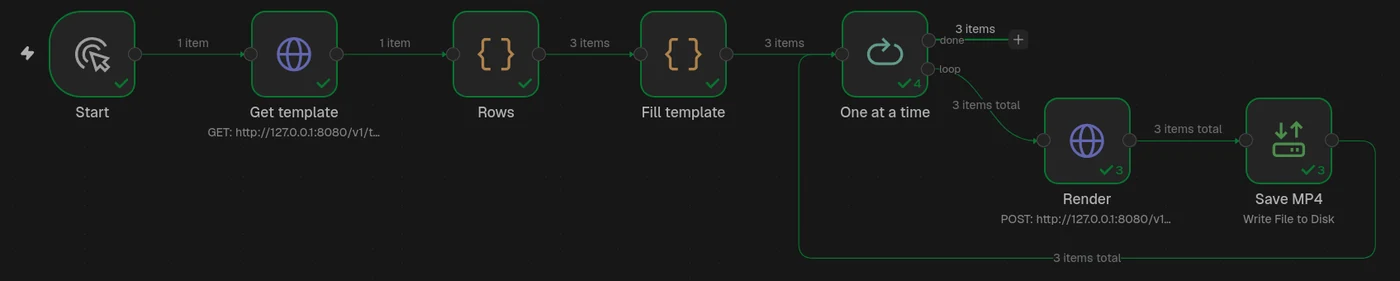
How it works
| Node | Type | What it does |
|---|---|---|
| Get template | HTTP Request | GET /v1/templates/vertical: one of the six starter documents, as JSON |
| Rows | Code | one item per video; stands in for a sheet, a form or a database |
| Fill template | Code | a copy of the template per row, with the row's values set in it |
| One at a time | Loop Over Items | sends the rows on one by one (why) |
| Render | HTTP Request | POST /v1/render; the MP4 comes back as the response, as a file |
| Save MP4 | Read/Write Files from Disk | writes it to the row's path, then the loop takes the next row |
A video here is a JSON document: nodes such as text, gradient and over, each with params, some of them animated. The template is an ordinary document, so nothing in it is marked as a variable; a row can set any param of any node. A column named node.param sets that param, and file names the MP4:
return [
  { json: { file: 'tip-01.mp4', 'label.text': 'TIP 01', 'line1.text': 'Ship the', 'line2.text': 'small version.' } },
  { json: { file: 'tip-02.mp4', 'label.text': 'TIP 02', 'line1.text': 'Write the', 'line2.text': 'test first.' } },
  { json: { file: 'tip-03.mp4', 'label.text': 'TIP 03', 'line1.text': 'Delete the', 'line2.text': 'dead code.' } },
];const folder = '/home/node/.n8n-files'; // where Save MP4 writes; n8n only writes inside ~/.n8n-files
const template = $('Get template').first().json;
return $input.all().map(({ json: row }, i) => {
const document = JSON.parse(JSON.stringify(template));
for (const [column, value] of Object.entries(row)) {
if (!column.includes('.')) continue; // "file" and other plain columns are just data
const [node, param] = column.split('.');
const params = document.nodes[node]?.params;
if (!params) throw new Error(`Column ${column}: the template has no node "${node}"`);
if (!(param in params)) throw new Error(`Column ${column}: "${node}" has no param "${param}" (it has ${Object.keys(params).join(', ')})`);
params[param] = value;
}
const file = row.file || `video-${i + 1}.mp4`;
return { json: { file, path: `${folder}/${file}`, document } };
});Render sends the document with inline: true, which puts the video in the response body, and its Response Format is File, so the MP4 arrives as binary data that any later node can take: a disk, a bucket, a drive, an upload.
{{ JSON.stringify({ document: $json.document, output: { inline: true, name: $json.file } }) }}The output object takes the same settings as uf export: size (720p to 4k), fps, codec (H.264, HEVC, AV1, VP9, ProRes), quality, a WebM or GIF by name. They're listed in the HTTP API reference.
Rows from a sheet or a form
Replace Rows with whatever holds your data: a Google Sheets or Airtable node, a form trigger, a database query. Fill template reads whichever items arrive, so a sheet whose header row reads file, label.text, line1.text, line2.text makes one video per row. Columns without a dot, such as an email address to send the video to, pass through untouched.
A column that names a node or a param the template doesn't have stops the run at Fill template, before anything renders:
Column line3.text: the template has no node "line3"
Column line1.txt: "line1" has no param "txt" (it has text, font, size, color, valign, tracking, position)
That second check matters: the engine ignores a param it doesn't know, so without it a misspelled column renders the template's own words with no error. POST /v1/check reports it as a warning if you want to check documents another way.
Your own design
Get template asks your server for vertical; title, square, promo, explainer and product are the other starters, all on the templates page with the nodes and params each one has. For a design of your own, write the document (by hand, from uf new vertical my.json, or with a coding agent; see the Claude Code and Codex guides), check it with uf check and uf review, put it anywhere that serves JSON, and point Get template at that URL. The column names then follow your node names.
The CSV guide uses the same node.param idea with uf batch on the command line, including a photo per row and checking every row before rendering.
Why one at a time
uf serve renders one request at a time on its GPU. Others wait their turn, and once 16 are waiting (ULTRAFAST_QUEUE) it answers 429 busy. n8n's HTTP Request node sends every item at once, so a first try at 100 rows without the loop failed with:
The service is receiving too many requests from youOne at a time (Loop Over Items, batch size 1) sends the next request when the last MP4 is saved. The GPU still never waits: the 100-row run below spent 18.3 of its 18.8 s rendering. The HTTP Request node's own Batching option spaces out when requests start, but they still overlap.
How long it takes
| 3 rows | 100 rows | |
|---|---|---|
| Whole run | 0.99 s | 18.8 s |
| Render node, all rows | 0.56 s | 18.3 s |
| Per video | 0.19 s | 0.18 s |
| Output | MP4, H.264, 1080×1920, 30 fps, 6 s; 0.21 to 0.28 MB each | |
Medians of five runs (three for 100 rows) with the RTX 5090 otherwise idle, timed from n8n's own start and stop times for the run, so n8n's start-up isn't counted. The first run after starting uf serve took 1.13 s for the three, while it set up the GPU. That's about the same per video as uf batch on the command line (0.17 to 0.18 s a row in the CSV guide), so n8n adds very little.
If it doesn't work
- "The service refused the connection - perhaps it is offline" with
uf serverunning: use127.0.0.1in the URLs, as the workflow does, notlocalhost. n8n's HTTP Request node tried the IPv6 address forlocalhostfirst, anduf servelistens on IPv4. - "Access to the file is not allowed" at Save MP4: n8n 2 only reads and writes files inside
~/.n8n-files(theN8N_RESTRICT_FILE_ACCESS_TOsetting). The workflow'sfolderis the Docker image's,/home/node/.n8n-files; for an npm install, write your home folder's full path (~isn't expanded). - n8n in Docker (not tested here): inside the container,
127.0.0.1is the container. Reach auf serveon the host throughhost.docker.internal(on Linux, start the container with--add-host=host.docker.internal:host-gateway), and mount a volume at/home/node/.n8n-filesto get the MP4s out. - 401: the credential's value is
Bearer, a space, then the key. - 413 over_limit: a video in the response body can be up to 32 MiB. For longer or bigger videos, drop
inline; the response is then a receipt with aurlto download the file from, valid for 7 days.
Hosted video APIs
JSON2Video and Creatomate have their own n8n nodes, and Shotstack is called from the HTTP Request node in community workflows. All three render in their cloud, so they need no GPU of yours, and they bring stock media, voices and template editors; they charge by the minute or in credits. With uf serve the GPU is yours, a render costs nothing per video, and the document can hold 3D, shaders, particles and Lottie. There's no hosted ultrafast API yet. The comparison page has their prices and formats side by side, and when each is the better choice.
Questions
Can n8n make videos without a paid video API?
Yes, with a render server of your own. uf serve, the self-hosted server that comes with the open-source ultrafast engine, takes a JSON document over HTTP and sends back the MP4, so an n8n HTTP Request node can make a video per row with no per-minute fee. It renders on your GPU: a Mac with Apple silicon, or Linux with a Vulkan GPU.
How fast is it?
In the tested workflow, three 6-second 1080×1920 videos took 0.99 s from n8n's start to finish and a hundred took 18.8 s, about 0.18 s a video, on one RTX 5090. That's about the same per video as uf batch on the command line, so n8n adds very little.
Does it work on n8n Cloud?
Only if n8n Cloud can reach your uf serve, which means putting the server on the internet with its API key. The workflow on this page was tested with a self-hosted n8n on the same machine as the server.
Can it make a video for every row of a Google Sheet?
Yes. Put the sheet's node in place of the Rows node and name its columns node.param, such as line1.text, plus file for the file name. The Fill template node copies the template per row, sets those params, and stops the run if a column names a node or a param the template doesn't have.
Why does the workflow loop over items one at a time?
uf serve renders one request at a time and queues up to 16, then answers 429. n8n's HTTP Request node sends every item at once, so 100 rows without the loop were refused. Looping one at a time keeps the GPU busy without overfilling the queue: 18.3 of the 18.8 s for 100 rows was rendering.
Why 127.0.0.1 and not localhost?
With localhost, n8n's HTTP Request node tried the IPv6 address first and got "The service refused the connection", because uf serve listens on IPv4. 127.0.0.1 works.